# ChartBytes
> Turn your numbers into bar, line, area, scatter, pie and donut chart images that show anywhere a picture can: emails, chat messages, documents and READMEs.
App · 1 action. Web page: https://docs.lodol.com/docs/integrations/chartbytes
## Actions
### Create chart
Draw a bar, horizontal bar, stacked bar, line, area, scatter, pie or donut chart from your labels and numbers, as a PNG or SVG. Returns a link to the picture, ready-made HTML and Markdown to show it in an email, page or README, the colour of each series, and the file itself when asked.
**Inputs**
- Chart type (`chart_type`, text): What kind of chart to draw. Bar, line and area charts can compare several series; pie and donut charts show one set of numbers as shares of a whole. One of: `bar`, `hbar` (Horizontal bar), `stacked` (Stacked bar), `line`, `area`, `scatter`, `pie`, `donut`. Default: `bar`.
- Labels (`labels`, list): The name of each point along the bottom of the chart, or of each slice of a pie, in the same order as the numbers. Leave empty to number them 1, 2, 3. A comma inside a label becomes a space.
- Values (`values`, list): The numbers to chart, one for each label. Use this for a single set of numbers, or Series for several.
- Series (`series`, object): Several sets of numbers to compare on one bar, line, area or scatter chart: give each a name and its numbers, one for each label, such as Revenue: 12, 19, 8, 24. ChartBytes draws no legend, so the result lists each series' colour for you to show.
- Title (`title`, text): A title shown above the chart. Leave empty for none.
- Format (`format`, text): PNG works everywhere, email included. SVG stays sharp at any size and is smaller, but many email apps don't show it. One of: `png`, `svg`. Default: `png`.
- Width (pixels) (`width`, number): How wide the chart is. 600 by default. From 80 to 2000. Default: `600`.
- Height (pixels) (`height`, number): How tall the chart is. 300 by default. From 80 to 2000. Default: `300`.
- Also save the chart as a file (`save_as_file`, true/false): Off by default, because the link is all an email, a chat message or a document needs. Turn it on when a later step needs the file itself: attaching it to an email, uploading it to storage, or posting it as a file. Default: `false`.
**Outputs**
- `chart_type` (text): The kind of chart: bar, hbar, stacked, line, area, scatter, pie or donut.
- `content_type` (text): The saved file's type, e.g. image/png, or '' when not saved.
- `document_ref` (text): The saved file's document reference, or '' when not saved.
- `documents` (list): The saved chart as a document, ready to attach to a later step. Empty when it was not saved.
- `file_size_bytes` (number): The saved file's size in bytes, or 0 when not saved.
- `file_url` (text): A URL that serves the saved file, or '' when not saved.
- `format` (text): The picture's format: png or svg.
- `height` (number): The chart's height in pixels.
- `image_tag` (text): The same link as an HTML ![]() tag, with alt text and the chart's width and height, for a step that writes an email or a page.
- `labels` (list): The label of each point or slice, in order: 1, 2, 3 when none were given.
- `legend` (list): The colour of each series (each slice, for a pie or donut), in order, for writing a legend next to the chart: ChartBytes draws none.
- `markdown` (text): The same link as a Markdown image, for a README, Notion or a chat message.
- `saved_as_file` (true/false): True when the chart was also saved as a file (Also save the chart as a file). The file fields are empty otherwise.
- `title` (text): The chart's title, or '' when it has none.
- `url` (text): A link to the chart's picture. It shows the chart anywhere a picture can go: an email, a chat message, a document or a web page.
- `width` (number): The chart's width in pixels.
**Example output**
```json
{
"chart_type": "bar",
"content_type": "",
"document_ref": "",
"documents": [],
"file_size_bytes": 0,
"file_url": "",
"format": "png",
"height": 300,
"image_tag": "
tag, with alt text and the chart's width and height, for a step that writes an email or a page.
- `labels` (list): The label of each point or slice, in order: 1, 2, 3 when none were given.
- `legend` (list): The colour of each series (each slice, for a pie or donut), in order, for writing a legend next to the chart: ChartBytes draws none.
- `markdown` (text): The same link as a Markdown image, for a README, Notion or a chat message.
- `saved_as_file` (true/false): True when the chart was also saved as a file (Also save the chart as a file). The file fields are empty otherwise.
- `title` (text): The chart's title, or '' when it has none.
- `url` (text): A link to the chart's picture. It shows the chart anywhere a picture can go: an email, a chat message, a document or a web page.
- `width` (number): The chart's width in pixels.
**Example output**
```json
{
"chart_type": "bar",
"content_type": "",
"document_ref": "",
"documents": [],
"file_size_bytes": 0,
"file_url": "",
"format": "png",
"height": 300,
"image_tag": " ",
"labels": [
"Q1",
"Q2",
"Q3",
"Q4"
],
"legend": [
{
"color": "#3B82F6",
"name": "Values"
}
],
"markdown": "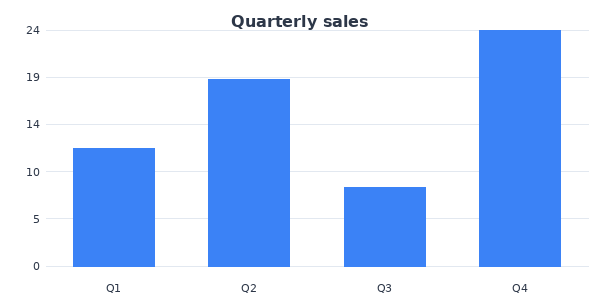",
"saved_as_file": false,
"title": "Quarterly sales",
"url": "https://chartbytes.meridian-digital.pro/chart?t=bar&d=12,19,8,24&labels=Q1,Q2,Q3,Q4&title=Quarterly%20sales&w=600&h=300",
"width": 600
}
```
",
"labels": [
"Q1",
"Q2",
"Q3",
"Q4"
],
"legend": [
{
"color": "#3B82F6",
"name": "Values"
}
],
"markdown": "",
"saved_as_file": false,
"title": "Quarterly sales",
"url": "https://chartbytes.meridian-digital.pro/chart?t=bar&d=12,19,8,24&labels=Q1,Q2,Q3,Q4&title=Quarterly%20sales&w=600&h=300",
"width": 600
}
```