# mcstatus.io
> Check any Minecraft server's live status through the keyless mcstatus.io public API. Get Java or Bedrock Edition status (online state, version, player count, MOTD, mods, and plugins), fetch a server's icon, render a status-widget banner image, and send Votifier votes. No account or API key required.
App · Gaming · 6 actions. Web page: https://docs.lodol.com/docs/integrations/mcstatus-io
## Actions
### Get Bedrock server status
Get the live status of a Bedrock Edition server: whether it is online, its version and protocol, the current and maximum player counts, the MOTD (raw, clean, and HTML), the gamemode, the server id, and the edition (MCPE or MCEE).
**Inputs**
- Server address (`address`, text, required): The server's connection address: a hostname or IP, optionally with a port as host:port. Leave the port off to use the edition's default (25565 for Java, 19132 for Bedrock).
- Timeout (seconds) (`timeout`, number): How long to wait for the server to respond before giving up. Optional; defaults to 5 seconds. From 1 to 30.
**Outputs**
- `host` (text)
- `motd` (object)
- `online` (true/false)
- `players` (object)
- `port` (number)
- `version` (object)
**Example output**
```json
{
"edition": "MCPE",
"eula_blocked": false,
"expires_at": 1681884186942,
"gamemode": "Survival",
"host": "demo.mcstatus.io",
"ip_address": "144.172.70.183",
"motd": {
"clean": "A Bedrock server\nYou cannot connect!",
"html": "A Bedrock server",
"raw": "A Bedrock server\nYou cannot connect!"
},
"online": true,
"players": {
"list": [],
"max": 100,
"online": 71
},
"plugins": [],
"port": 19132,
"retrieved_at": 1681884126942,
"server_id": "8919800251809186875",
"software": null,
"version": {
"name": "1.19.70",
"protocol": 575
}
}
```
### Get Bedrock server widget
Render a Bedrock Edition server's status as a banner image (PNG) showing its MOTD, version, and player count. Returns a live embeddable URL, Markdown and HTML snippets, and a base64 data URI. Customise the look with the dark, rounded, and transparent options.
**Inputs**
- Server address (`address`, text, required): The server's connection address: a hostname or IP, optionally with a port as host:port. Leave the port off to use the edition's default (25565 for Java, 19132 for Bedrock).
- Dark mode (`dark`, true/false): Use the dark colour scheme. Enabled by default. Default: `true`.
- Rounded corners (`rounded`, true/false): Round the widget's corners. Enabled by default. Default: `true`.
- Transparent background (`transparent`, true/false): Make the widget background transparent. Disabled by default. Default: `false`.
- Timeout (seconds) (`timeout`, number): How long to wait for the server to respond before giving up. Optional; defaults to 5 seconds. From 1 to 30.
**Outputs**
- `content_type` (text)
- `html` (text)
- `image` (text)
- `markdown` (text)
- `url` (text)
**Example output**
```json
{
"content_type": "image/png",
"html": " ",
"image": "data:image/png;base64,iVBORw0KGgoAAAANSUhEUgAAAEA...",
"markdown": "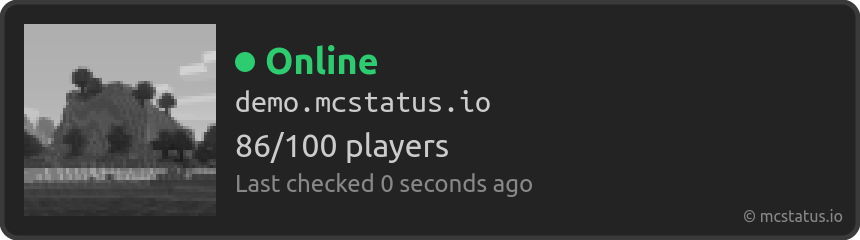",
"url": "https://api.mcstatus.io/v2/widget/bedrock/demo.mcstatus.io?dark=true&rounded=true"
}
```
### Get Java server status
Get the live status of a Java Edition server: whether it is online, its version and protocol, the current and maximum player counts (and a sample player list when the server shares one), the MOTD (raw, clean, and HTML), the server icon, and any advertised mods, plugins, and software.
**Inputs**
- Server address (`address`, text, required): The server's connection address: a hostname or IP, optionally with a port as host:port. Leave the port off to use the edition's default (25565 for Java, 19132 for Bedrock).
- Include query data (`enable_query`, true/false): Also use the server's query protocol to fetch extra details such as the plugin list. Enabled by default; it has no effect on servers that keep query disabled. Default: `true`.
- Timeout (seconds) (`timeout`, number): How long to wait for the server to respond before giving up. Optional; defaults to 5 seconds. From 1 to 30.
**Outputs**
- `host` (text)
- `motd` (object)
- `online` (true/false)
- `players` (object)
- `port` (number)
- `version` (object)
**Example output**
```json
{
"eula_blocked": false,
"expires_at": 1681883705007,
"host": "demo.mcstatus.io",
"icon": "data:image/png;base64,iVBORw0KGgoAAAANSUhEUgAAAEAAAABA...",
"ip_address": "144.172.70.183",
"mods": [
{
"name": "applied-energistics-2",
"version": "11.7.2"
}
],
"motd": {
"clean": ">>> Minecraft Server Status <<<",
"html": ">>> Minecraft Server Status <<<",
"raw": "\u00a7f>>> Minecraft Server Status <<<"
},
"online": true,
"players": {
"list": [
{
"name_clean": "Notch",
"name_html": "Notch",
"name_raw": "Notch",
"uuid": "069a79f4-44e9-4726-a5be-fca90e38aaf5"
}
],
"max": 100,
"online": 71
},
"plugins": [
{
"name": "WorldEdit",
"version": "7.2.14"
}
],
"port": 25565,
"retrieved_at": 1681883645007,
"software": "github.com/mcstatus-io/demo-server",
"srv_record": null,
"version": {
"name_clean": "1.20.1",
"name_html": "1.20.1",
"name_raw": "1.20.1",
"protocol": 763
}
}
```
### Get Java server widget
Render a Java Edition server's status as a banner image (PNG) showing its icon, MOTD, version, and player count. Returns a live embeddable URL, Markdown and HTML snippets, and a base64 data URI. Customise the look with the dark, rounded, and transparent options.
**Inputs**
- Server address (`address`, text, required): The server's connection address: a hostname or IP, optionally with a port as host:port. Leave the port off to use the edition's default (25565 for Java, 19132 for Bedrock).
- Dark mode (`dark`, true/false): Use the dark colour scheme. Enabled by default. Default: `true`.
- Rounded corners (`rounded`, true/false): Round the widget's corners. Enabled by default. Default: `true`.
- Transparent background (`transparent`, true/false): Make the widget background transparent. Disabled by default. Default: `false`.
- Timeout (seconds) (`timeout`, number): How long to wait for the server to respond before giving up. Optional; defaults to 5 seconds. From 1 to 30.
**Outputs**
- `content_type` (text)
- `html` (text)
- `image` (text)
- `markdown` (text)
- `url` (text)
**Example output**
```json
{
"content_type": "image/png",
"html": "
",
"image": "data:image/png;base64,iVBORw0KGgoAAAANSUhEUgAAAEA...",
"markdown": "",
"url": "https://api.mcstatus.io/v2/widget/bedrock/demo.mcstatus.io?dark=true&rounded=true"
}
```
### Get Java server status
Get the live status of a Java Edition server: whether it is online, its version and protocol, the current and maximum player counts (and a sample player list when the server shares one), the MOTD (raw, clean, and HTML), the server icon, and any advertised mods, plugins, and software.
**Inputs**
- Server address (`address`, text, required): The server's connection address: a hostname or IP, optionally with a port as host:port. Leave the port off to use the edition's default (25565 for Java, 19132 for Bedrock).
- Include query data (`enable_query`, true/false): Also use the server's query protocol to fetch extra details such as the plugin list. Enabled by default; it has no effect on servers that keep query disabled. Default: `true`.
- Timeout (seconds) (`timeout`, number): How long to wait for the server to respond before giving up. Optional; defaults to 5 seconds. From 1 to 30.
**Outputs**
- `host` (text)
- `motd` (object)
- `online` (true/false)
- `players` (object)
- `port` (number)
- `version` (object)
**Example output**
```json
{
"eula_blocked": false,
"expires_at": 1681883705007,
"host": "demo.mcstatus.io",
"icon": "data:image/png;base64,iVBORw0KGgoAAAANSUhEUgAAAEAAAABA...",
"ip_address": "144.172.70.183",
"mods": [
{
"name": "applied-energistics-2",
"version": "11.7.2"
}
],
"motd": {
"clean": ">>> Minecraft Server Status <<<",
"html": ">>> Minecraft Server Status <<<",
"raw": "\u00a7f>>> Minecraft Server Status <<<"
},
"online": true,
"players": {
"list": [
{
"name_clean": "Notch",
"name_html": "Notch",
"name_raw": "Notch",
"uuid": "069a79f4-44e9-4726-a5be-fca90e38aaf5"
}
],
"max": 100,
"online": 71
},
"plugins": [
{
"name": "WorldEdit",
"version": "7.2.14"
}
],
"port": 25565,
"retrieved_at": 1681883645007,
"software": "github.com/mcstatus-io/demo-server",
"srv_record": null,
"version": {
"name_clean": "1.20.1",
"name_html": "1.20.1",
"name_raw": "1.20.1",
"protocol": 763
}
}
```
### Get Java server widget
Render a Java Edition server's status as a banner image (PNG) showing its icon, MOTD, version, and player count. Returns a live embeddable URL, Markdown and HTML snippets, and a base64 data URI. Customise the look with the dark, rounded, and transparent options.
**Inputs**
- Server address (`address`, text, required): The server's connection address: a hostname or IP, optionally with a port as host:port. Leave the port off to use the edition's default (25565 for Java, 19132 for Bedrock).
- Dark mode (`dark`, true/false): Use the dark colour scheme. Enabled by default. Default: `true`.
- Rounded corners (`rounded`, true/false): Round the widget's corners. Enabled by default. Default: `true`.
- Transparent background (`transparent`, true/false): Make the widget background transparent. Disabled by default. Default: `false`.
- Timeout (seconds) (`timeout`, number): How long to wait for the server to respond before giving up. Optional; defaults to 5 seconds. From 1 to 30.
**Outputs**
- `content_type` (text)
- `html` (text)
- `image` (text)
- `markdown` (text)
- `url` (text)
**Example output**
```json
{
"content_type": "image/png",
"html": " ",
"image": "data:image/png;base64,iVBORw0KGgoAAAANSUhEUgAAAEA...",
"markdown": "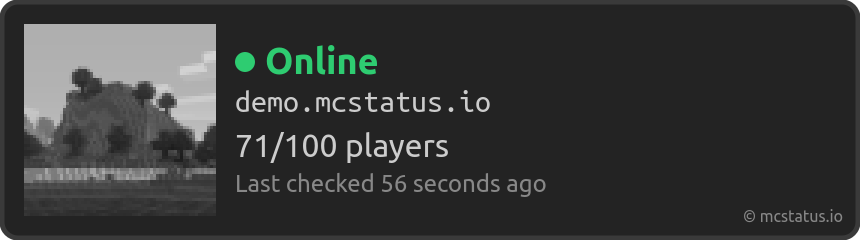",
"url": "https://api.mcstatus.io/v2/widget/java/demo.mcstatus.io?dark=true&rounded=true"
}
```
### Get server icon
Get a Java Edition server's 64x64 icon as a PNG. Returns a live embeddable URL, ready-to-use Markdown and HTML snippets, and a base64 data URI of the image. Falls back to the default icon when the server is offline or has no custom icon.
**Inputs**
- Server address (`address`, text, required): The server's connection address: a hostname or IP, optionally with a port as host:port. Leave the port off to use the edition's default (25565 for Java, 19132 for Bedrock).
- Timeout (seconds) (`timeout`, number): How long to wait for the server to respond before giving up. Optional; defaults to 5 seconds. From 1 to 30.
**Outputs**
- `content_type` (text)
- `html` (text)
- `image` (text)
- `markdown` (text)
- `url` (text)
**Example output**
```json
{
"content_type": "image/png",
"html": "
",
"image": "data:image/png;base64,iVBORw0KGgoAAAANSUhEUgAAAEA...",
"markdown": "",
"url": "https://api.mcstatus.io/v2/widget/java/demo.mcstatus.io?dark=true&rounded=true"
}
```
### Get server icon
Get a Java Edition server's 64x64 icon as a PNG. Returns a live embeddable URL, ready-to-use Markdown and HTML snippets, and a base64 data URI of the image. Falls back to the default icon when the server is offline or has no custom icon.
**Inputs**
- Server address (`address`, text, required): The server's connection address: a hostname or IP, optionally with a port as host:port. Leave the port off to use the edition's default (25565 for Java, 19132 for Bedrock).
- Timeout (seconds) (`timeout`, number): How long to wait for the server to respond before giving up. Optional; defaults to 5 seconds. From 1 to 30.
**Outputs**
- `content_type` (text)
- `html` (text)
- `image` (text)
- `markdown` (text)
- `url` (text)
**Example output**
```json
{
"content_type": "image/png",
"html": " ",
"image": "data:image/png;base64,iVBORw0KGgoAAAANSUhEUgAAAEA...",
"markdown": "",
"url": "https://api.mcstatus.io/v2/icon/demo.mcstatus.io"
}
```
### Send Votifier vote
Send a Votifier vote to a Minecraft server. Requires the server host and the voting username, plus one credential: a Votifier 2 token (preferred) or a Votifier 1 RSA public key. The server must be running a Votifier-compatible listener.
**Inputs**
- Server host (`host`, text, required): The Minecraft server's hostname or IP running the Votifier listener, e.g. play.example.com.
- Username (`username`, text, required): The Minecraft username being credited with the vote.
- Votifier 2 token (`token`, text): The Votifier 2 token from the server's plugin config. Provide this (preferred) or a Votifier 1 public key.
- Votifier 1 public key (`public_key`, text): The Votifier 1 RSA public key (the contents of the server's rsa/public.key). Provide this or a Votifier 2 token.
- Votifier port (`port`, number): The Votifier listener port. Defaults to 8192. From 1 to 65535. Default: `8192`.
- Player UUID (`uuid`, text): The voting player's Minecraft UUID. Optional.
- Service name (`service_name`, text): The service name recorded with the vote. Defaults to mcstatus.io. Default: `mcstatus.io`.
- Vote time (`timestamp`, date and time): When the vote occurred. Optional; defaults to the time the action runs.
- Player IP address (`ip`, text): The voting player's IP address. Optional; defaults to the request's IP.
- Timeout (seconds) (`timeout`, number): How long to wait for the server to respond before giving up. Optional; defaults to 5 seconds. From 1 to 30.
**Outputs**
- `message` (text)
- `success` (true/false)
**Example output**
```json
{
"message": "The vote was successfully sent to the server.",
"success": true
}
```
",
"image": "data:image/png;base64,iVBORw0KGgoAAAANSUhEUgAAAEA...",
"markdown": "",
"url": "https://api.mcstatus.io/v2/icon/demo.mcstatus.io"
}
```
### Send Votifier vote
Send a Votifier vote to a Minecraft server. Requires the server host and the voting username, plus one credential: a Votifier 2 token (preferred) or a Votifier 1 RSA public key. The server must be running a Votifier-compatible listener.
**Inputs**
- Server host (`host`, text, required): The Minecraft server's hostname or IP running the Votifier listener, e.g. play.example.com.
- Username (`username`, text, required): The Minecraft username being credited with the vote.
- Votifier 2 token (`token`, text): The Votifier 2 token from the server's plugin config. Provide this (preferred) or a Votifier 1 public key.
- Votifier 1 public key (`public_key`, text): The Votifier 1 RSA public key (the contents of the server's rsa/public.key). Provide this or a Votifier 2 token.
- Votifier port (`port`, number): The Votifier listener port. Defaults to 8192. From 1 to 65535. Default: `8192`.
- Player UUID (`uuid`, text): The voting player's Minecraft UUID. Optional.
- Service name (`service_name`, text): The service name recorded with the vote. Defaults to mcstatus.io. Default: `mcstatus.io`.
- Vote time (`timestamp`, date and time): When the vote occurred. Optional; defaults to the time the action runs.
- Player IP address (`ip`, text): The voting player's IP address. Optional; defaults to the request's IP.
- Timeout (seconds) (`timeout`, number): How long to wait for the server to respond before giving up. Optional; defaults to 5 seconds. From 1 to 30.
**Outputs**
- `message` (text)
- `success` (true/false)
**Example output**
```json
{
"message": "The vote was successfully sent to the server.",
"success": true
}
```